


When we use Playwright in commercial projects, we quickly discover that reporting has a number of limitations. There is a need for a tool that would allow for effective monitoring of test results and application status.
Today I will introduce you to one of the solutions that may change your perspective on how to analyze and improve tests in Playwright.
Currents.dev
We most often encounter the need to debug and analyze the history of test runs in commercial projects. There, the requirements for test stability and optimization are so high that it is worth using commercial (paid) tools.
One of such paid solutions is the website 🔗https://currents.dev/. I decided to take a closer look at it and share my observations with you.
💡
Thanks to our cooperation, we obtained a mega discount code for you!
It gives a 10% discount on each plan for a period of 12 months😍
And the first 14 days are 100% free, even without purchasing (only an email is required for registration)🤯
Discount code:
PWINFO10
Check out the Playwright Dashboard and see how it can support your project:
🔗https://currents.dev/
How to use discount code? 🤔
1. Select your current plan
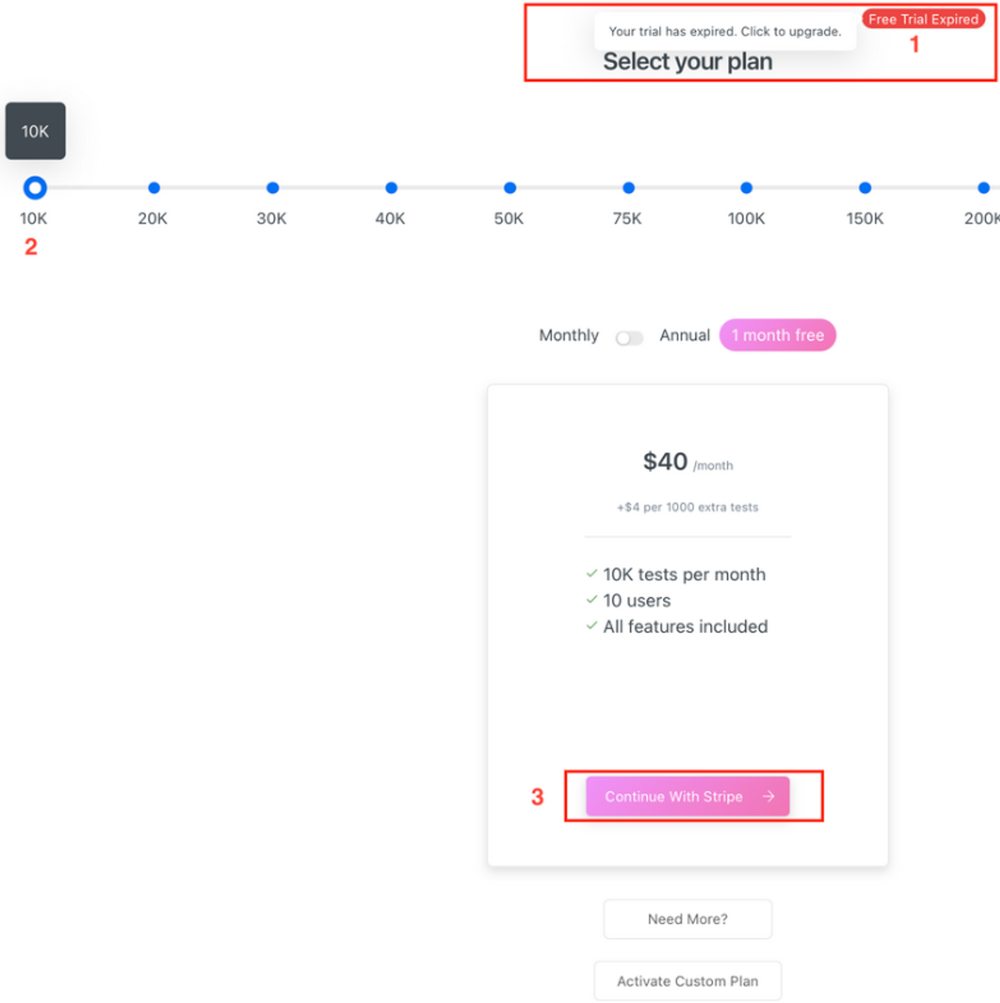
2. Choose your target plan
3. Press “Continue with Stripe”
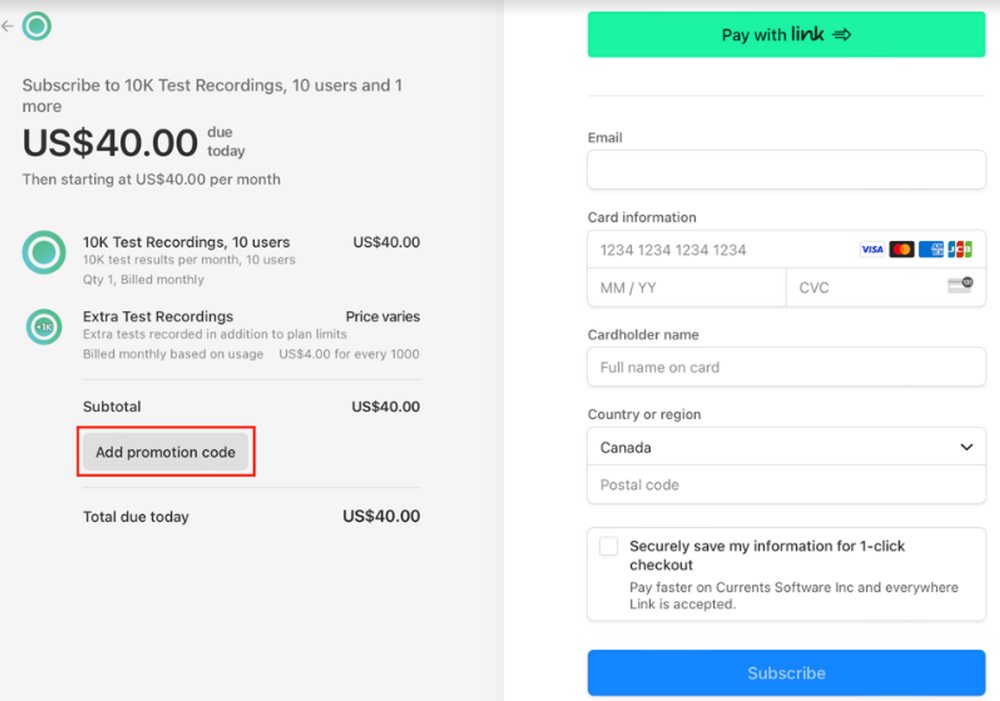
4. Add a promotional code using the Add Promotion Code option:
What is Currents?
From the documentation 🔗https://currents.dev/readme/ we can read:
A cloud recording service for Playwright and Cypress tests. Currents is a cloud service that helps QA and software teams debug, troubleshoot and analyze their parallel CI Playwright and Cypress CI tests.
https://currents.dev/readme/
It is a cloud solution for collecting, presenting and analyzing test results. Currently (April 2024) it integrates with Cypress and Playwright tools.
How to get started with Currents?🤔
In practice, starting your adventure with this toot everything comes down to following steps:
- create a free account at 🔗https://currents.dev/
- install the plugin in an automated testing project (based on Cypress or Playwright):
- Playwright: 🔗https://www.npmjs.com/package/@currents/playwright for Cypress depending on version:
- settings token for the created account in the test configuration (or when running tests)
That’s it for the configuration.
Now, when we want to see the first results on the platform, all we need to do is:
- run tests (locally or on CI/CD) and the test results will be automatically sent to your Currents account
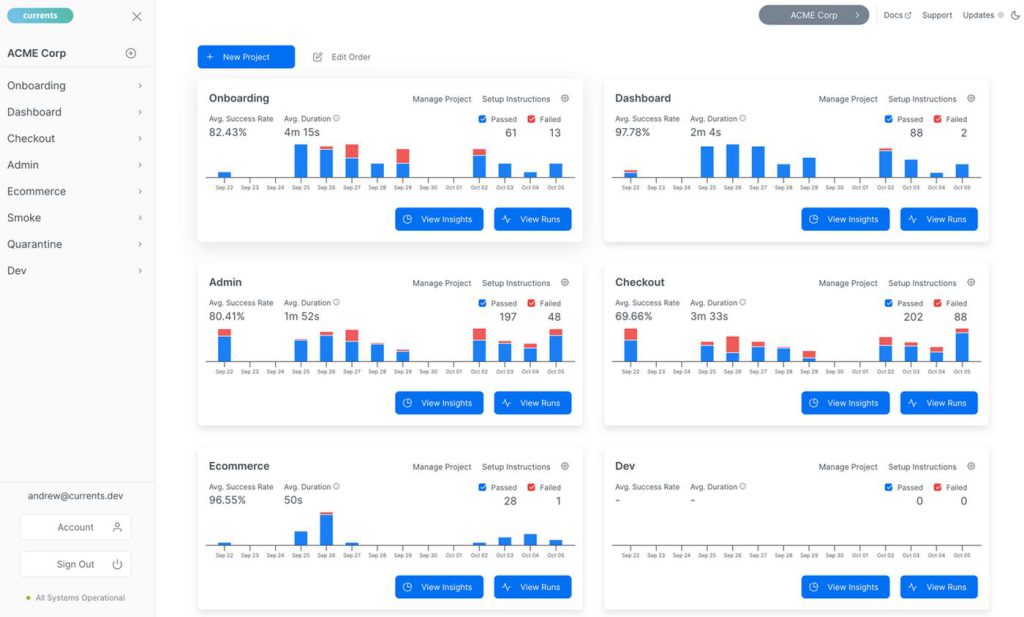
After running the tests on our account, we receive the test results (including screenshots, videos, logs, etc.) and analysis of the results (number of errors, average execution times, percentage of test flakes, changes in performance, etc.):
How much does it cost?
Currents offers a free plan that allows you to use the platform for 14 days free of charge (100% free, just provide your email). During this time, we have access to all functions and can freely test the capabilities of this tool.
The cost of the minimum plan after the free period is currently USD 37 per month (with an annual subscription, and the exact and current price list can be found here: 🔗 https://currents.dev/#pricing ).
💡
You can also use our discount code which gives you a 10% discount on any plan for 12 months. Then the price is about USD 33.
A discount code:
PWINFO10
Is that a lot?
What features do we get in return?
When is a minimal plan enough?
This is where we started our tests…😎
📢
The price of the access plan depends on the number of test results.
The free account offers 14 days of access, 10,000 test results per month and 10 team/project members.
What is 10,000 test results?
It is simply an individual post-test score. The 10,000 limit means you can store results from e.g.
- 1 test run 10,000 times,
- 100 tests performed 100 times,
- 1000 tests performed 10 times,
etc.
🤔
Is 10,000 test results a month a lot or a little?
It depends on the needs of the project, the number of tests and their frequency of running 😉
I recommend counting approximately how many test results you generate in your project every month.
For example:
- number of automatic tests in the project: 100
- tests are run 4 times a day
- tests are run on all working days of the month, which means: 21 days
After simple calculations, we get 8,400 results per month. In this case, we can stay within the minimum paid plan.
However, the above calculations should take into account:
- additional test runs (after deployment, during regression, etc.)
- implementation of new tests
- infrastructure and configuration testing
💡
TIP: If you are close to the limit and want to, for example, jump to a higher plan, feel free to contact the Currents team😉 I can say from experience that they respond quickly😉
Our first tests
Before starting to use Currents, we prepared a project to see what features the platform offers.
Methodology
What have we prepared for our tests?
- free account on the platform 🔗https://currents.dev/
- by default, a free account offers:
- 14 days
- 10,000 test results per month and
- 10 team/project members
- as part of the cooperation, I received virtually unlimited access to the platform, thanks to which I could check various scenarios
- by default, a free account offers:
- a specially prepared set of tests written in Playwright and TypeScript
- some of the tests involved interacting with the test website
- most of the tests were simple tests containing a single assertion
- we have implemented a mechanism to easily control the number of tests, their execution time or the probability of errors
Connecting tests to Currents
In the first step, when we have automatic tests, we need to connect them to our account. The whole thing is very simple.
What steps need to be fixed?
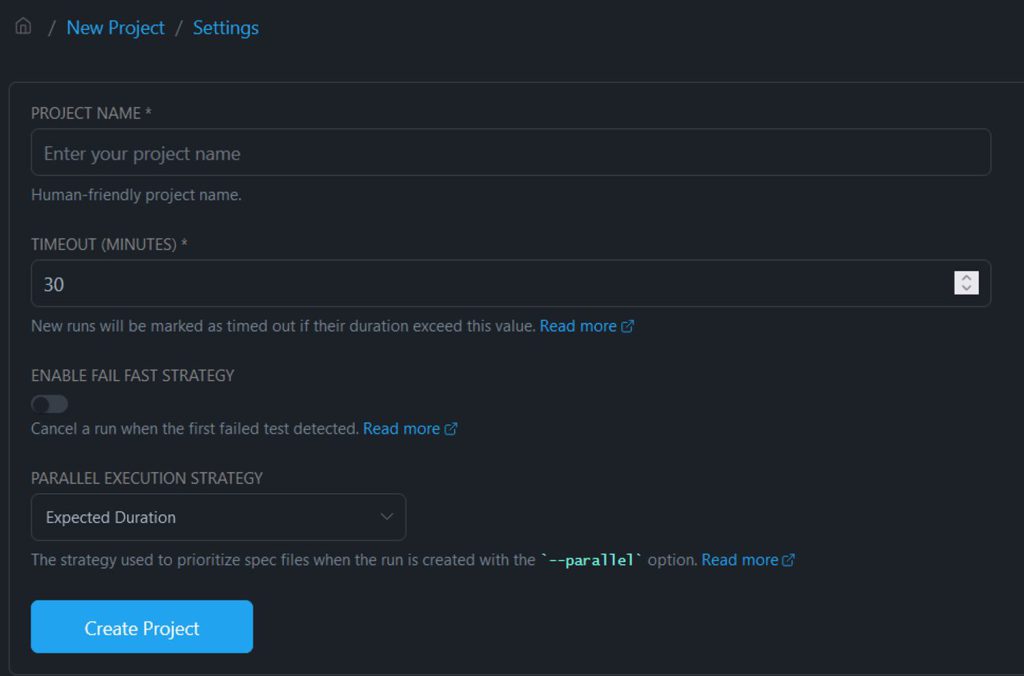
1. First, we create a new project in Currents to which we will attach our tests:
2. Then we receive simple and clear instructions on how to send the results of our tests so that they are visible in the project (we have blurred sensitive data):

3. We perform next steps locally – that is, we install a dedicated plugin, add a trace and run the tests using the command indicated in the project on Currents
4. On the console we get the result:
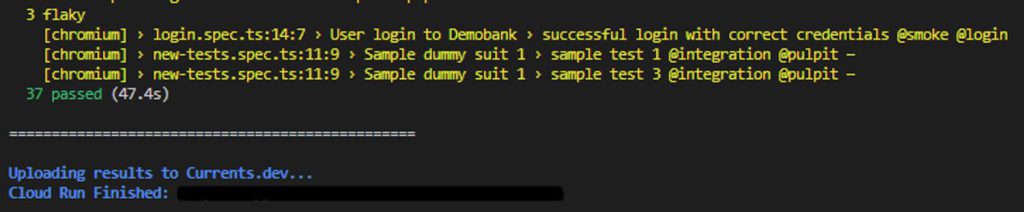
5. The result after running the tests appears on our project page:
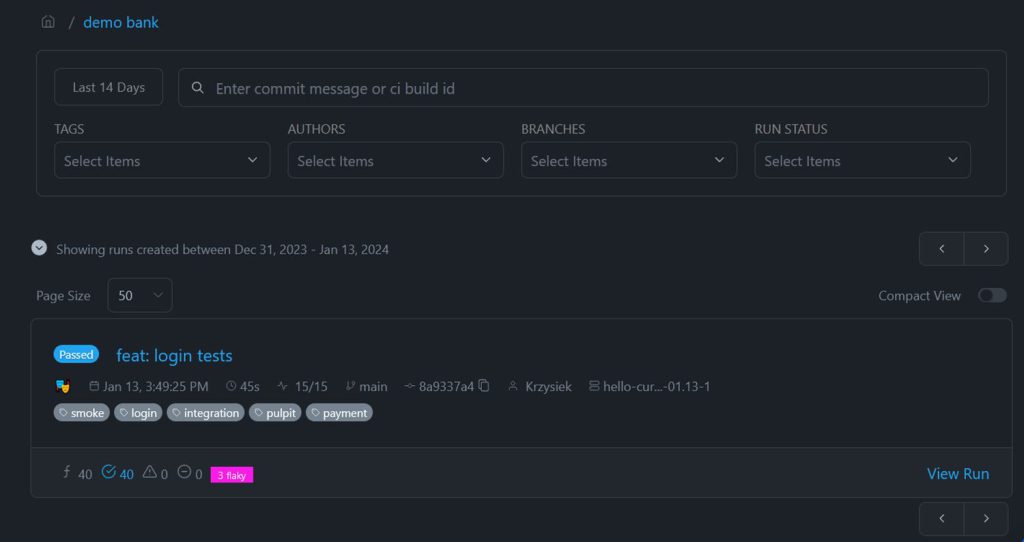
We have the project connected… and what’s next?
Now all that’s left to do is continue running the tests! 😁
We can run tests:
- locally
- on CI/CD
Then the results from each test are sent to our account.
And after collecting the results, Currents shows its capabilities😎
Results, statistics and charts
The test results, along with all metrics (number of tests, launch time, number of flaky tests, etc.) are appropriately aggregated and presented in the form of clear charts.
We finally have something that we won’t see in the default Playwright reports – execution history.

We also have a very clear summary of the duration of individual runes:

As well as information about the number of running tests and test files (this is important information, but more on that in a moment):

Another superfunction for Playwright is the visualization of the load of individual workers. We can use it to analyze whether we have optimally performed parallelization and whether the tests do not take too long.
The whole thing is placed under Run Summary, in the Playwright Runners section. Additionally, we have insight into the results per project (configured in playwright.config.ts):

What is the practical use of this information? Read on – we describe it in examples!👇
Reports
We can also configure reports that are automatically sent to e-mail.

The reports also provide detailed information about changes in test performance, flaky tests, run times for individual .specs and tests, etc.

We also have an indication of trends. We can read from it, for example, which specific tests resulted in performance degradation:
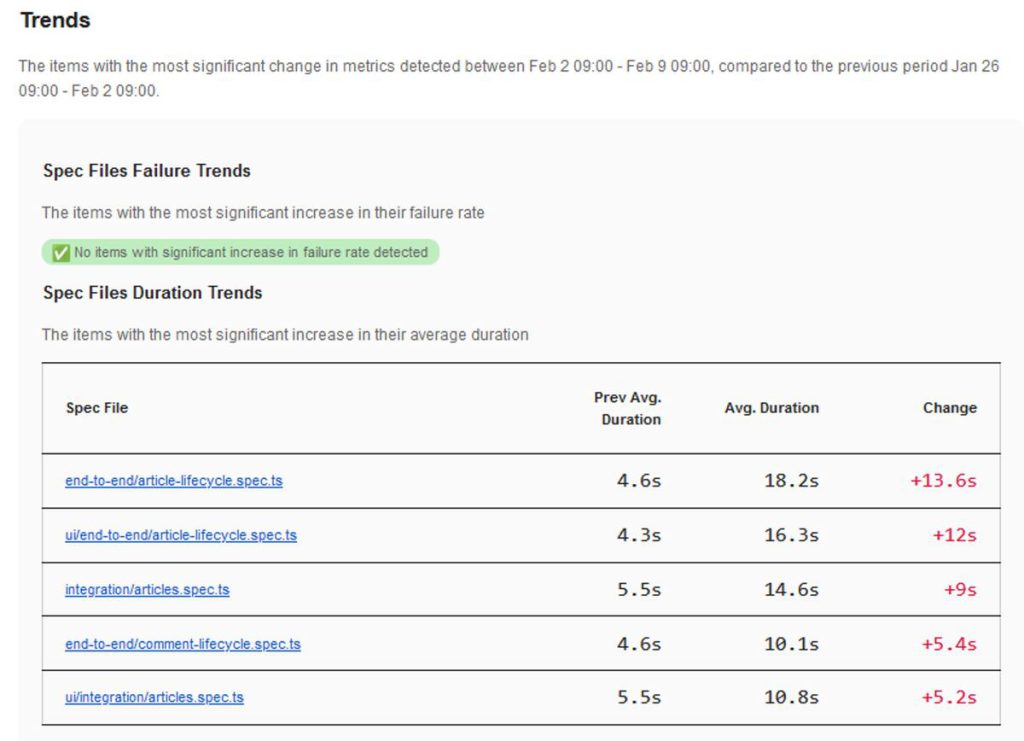
Everything generated automatically based on the data we sent to Currents🤩
Updates and news
Currents is actively developed and various updates, such as bugfixes and new functionalities, appear regularly.
Each update is visible in the upper right corner of the page – thanks to this we can easily find out about what’s new:

How do we use Currents?
After going through the trial period, we decided to continue using Currents😉
At jaktestowac.pl, we currently use Currents to develop our Automatic Testing Program with Playwright, which is currently used by over 450 people.
Why?
Let’s start with what we teach in these materials:
- we develop an advanced framework for front-end and back-end testing
- we make various architectural decisions, implement them and discuss their advantages and disadvantages
- we write automatic tests based on our original application 🦎GAD (🔗https://playwrightmaster.com/about-gad/), which offers many challenges during automation (front-end, back-end, data management, various test elements and many more)
We develop the framework together with the students, for whom we have prepared a repository of code for each lesson.
At the same time, we have the entire test code plugged into the full CI/CD process as:
- nightly tests (run at night)
- tests run when merging code
- tests run on-demand (i.e. manually)
This setup allows us to ensure:
- no errors in the created framework during courses
- compatibility with the constantly developed 🦎GAD application
- testing future versions of Playwright to quickly respond to changes introduced by PW creators and make corrections to the course
- detection of unstable tests (flaky tests), ability to analyze and quickly introduce corrections
What role does Currents play here?
Thanks to Currents we have:
- 🗺️ all results collected in one place – we save a lot of time browsing the results
- 🐞 transparent information about unstable tests (flaky tests) – we can quickly spot problems and start analyzing and repairing them
- 📊 statistics and metrics (e.g. number of tests, test duration, test efficiency, number of flaky tests, number of errors in tests, etc.) – if performance deteriorates, we immediately see it in the statistics – 🔗 https://currents.dev /readme/insights/test-suite-performance-explorer
- 📋 reports with weekly summary (error information, performance summary, etc.) – once again we save time on analyzing data and we have an additional overview of metrics for various projects🤩 🔗 https://currents.dev/readme/insights/automated-reports
As you can see, when developing our courses, we placed great emphasis on the quality of our materials.
Thanks to this, our students learn from lessons in which we minimize the risk of errors. And what’s important – we have an early warning system against errors! 😉
At the same time, we continue to test the Currents platform and report potential improvements.
Our use cases
Below you will read about the specifics of how we use Currents😉
Case 1 – optimal number of workers in tests
In projects, it is advisable to have quick feedback from tests😉
Thanks to this, we save:
- ⌛ time – waiting for the result and the opportunity to take further actions
- 💸 money – the cost of the machines on which we run the tests
That’s why it’s a common practice to parallelize tests💪 In Playwright, this can be done in a simple way – using workers (to put it very simply – threads on which we run tests).
A larger number of workers allows you to run more tests in parallel. However, more does not always mean better and faster.
At some point we reach a critical point where workers become “starved”. This means that a given worker no longer has anything to run in a given project and must wait for the remaining tasks to finish.
Thanks to Currents, we can diagnose the critical point in a simple and transparent way. Below is a screenshot of running the tests on 2 workers (on the left) and on 4 (on the right):

Free spaces between tasks are undesirable – they mean that the worker is waiting for the task. We may also notice that the time of individual tests has increased – this may result in too much load for the tested application and the machine on which we run the tests.
How did this translate into the duration of the tests?
Tests run on 4 workers lasted 53 seconds, and on 2 – 52 seconds!
So the times are very close to each other.
What can we improve?
- reduce the number of workers
- increase the granularity of tests
- increase resources for the machine that hosts the application under test and on which we run the tests
- use the fullyParallel option (i.e. also parallelization of tests from a given module) – 🔗https://playwright.dev/docs/api/class-testconfig#test-config-fully-parallel
Case 2 – flaky test detection
When developing an automated testing framework, sooner or later we will encounter flaky tests.
Flaky test is:
a test that provides different results, such as passing or failing, even if there are no changes to the source code or execution environment.
In our case, we detected such tests in our set:
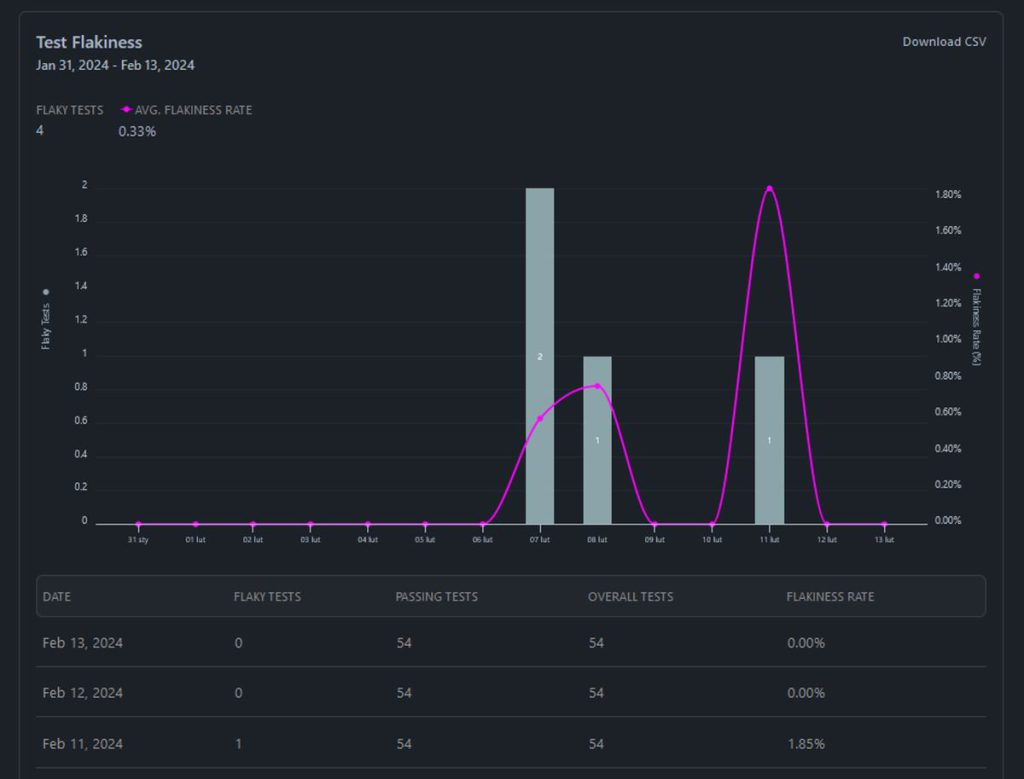
We can go into the details of a given test to view its:
- metrics and historical data
- detailed errors
- trace with all logs and information about actions performed during the test
Such detailed data looks like this:

Moving on to the details of this case – during very fast operations via the REST API (create, modify, delete), a race occurs.
The application is in the process of creating a resource, and we already want to delete this resource. If the resource is not ready yet, we receive a 404 when we try to delete it.
🤔
What does it look like in this case?
Flaky tests were intentional here. The application we are developing and testing has intentional low performance. Thanks to this, we can show the challenges during test automation using a simple example😉
The statistics, metrics and reports that Currents offers allow you to quickly detect and analyze such cases. And thus we can quickly move on to finding a solution, which may lie either on the testing side or on the application side! 😉
Case 3 – finding errors in Playwright
We also run our tests on future versions of Playwright🎭
Thanks to this, we make sure that:
- our tests work correctly, and if not, we have an early warning system against incompatibility and we have time to implement corrections 😉
- Playwright has no errors – so we take some work from the Creators of Playwright😁
And now let’s get down to specifics 😉 The stable version of Playwright was v1.41.2, and in one of the projects we ran our tests on version 1.42.0-alpha-2024-02-09
Thanks to this, we noticed some disturbing errors:

This means that the answers do not have a body🤔
In this particular test, we are trying to get the body from the response, which is a redirect.
After quick analysis, we decided to report this behavior as a bug to Playwright: 🔗https://github.com/microsoft/playwright/issues/29441
The Playwright team’s reaction was immediate🔥
The report was actually classified as a bug🐞
The fix will be implemented in version 1.42 😉
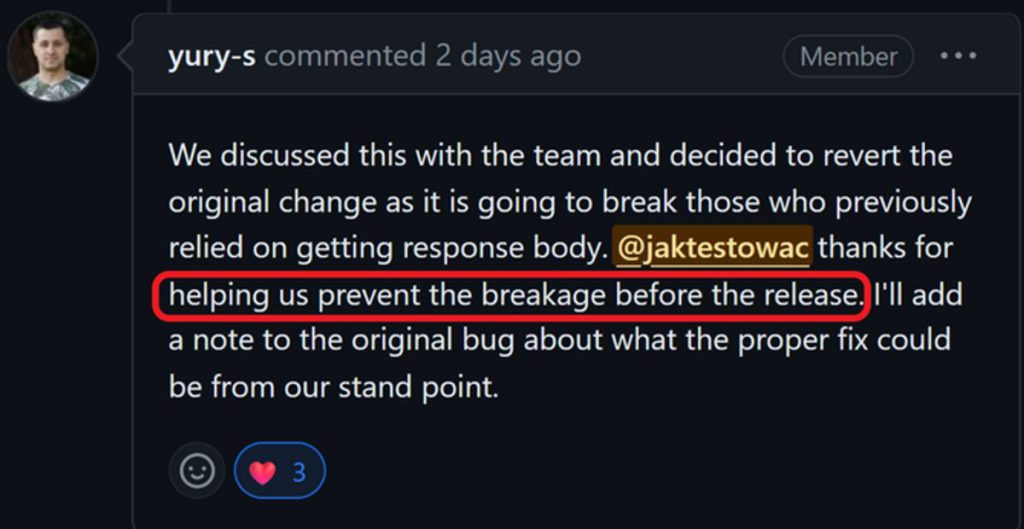
Thanks to this, we helped ensure the quality of a tool that is used by millions of people around the world😉

Statistics in the service of the application
Another advantage of this type of dashboards is the ability to monitor execution time and potential degradation of end-to-end tests.
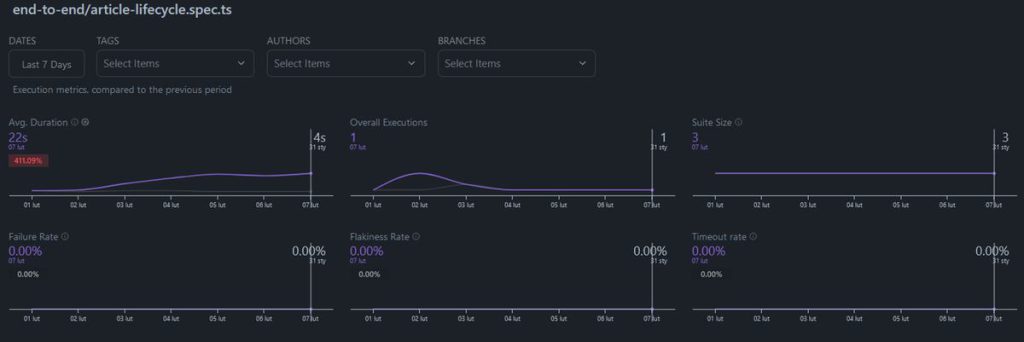
These types of tests map scenarios that simulate the interaction path of a potential website user.
Having automated such a scenario, we are able to examine the test speed. Therefore, we are able to monitor its implementation in subsequent application releases.
This type of information can be crucial as we may discover, for example, degradation of performance.
Of course, performance topics are a much broader issue. However, we can start by monitoring application-critical functions and user paths. Thanks to this, we are able to detect the first symptoms related to a trend, e.g. slower and slower test performance.

Advantages and disadvantages
Each tool has its strengths and weaknesses.
So let’s take a look at what it’s like with Currents🤔
Advantages
✅ Lots of options and statistics
The platform offers a whole host of automatically generated statistics and metrics.
✅ Ability to configure multiple projects
We can prepare many projects that will include:
- single test suits
- completely separate projects
- tests on different versions of applications or libraries
- and any other combinations😉
✅ Collective reports on the status of tests sent by e-mail
We can configure collective reports sent once a week by e-mail. They contain information about the status of our tests: the number of running tests, execution time, changes in performance, various trends, etc.
✅ Easy to configure
From creating an account to presenting the first results, you need 2-3 minutes. The entire configuration is clearly described with examples. Additionally, there are 2 ways to connect our tests to Currents – we can choose which one suits us better.
✅ Good documentation
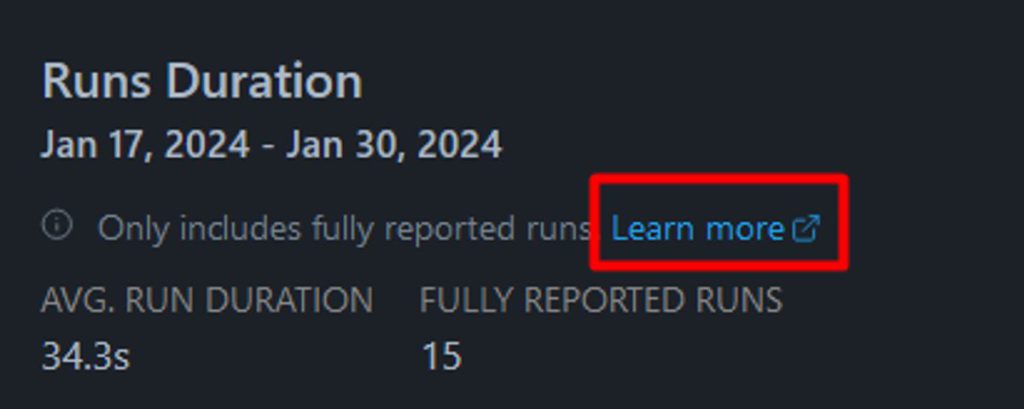
The documentation for the platform is extremely detailed. It contains many examples and precisely explained mechanisms of action. What’s also great – in various places on the website (near charts, statistics, various options) there is a link to the documentation:
✅ Contact with the creators and team
The team is extremely responsive🤩 Our questions or issues were resolved quickly. Some topics were covered even in just a few minutes!
Individual matters
🤔 Costs
Currents is a paid tool, which may be a disadvantage when looking to save money on your budget. However, it is worth remembering that in return we receive benefits often unavailable in free open-source projects. Currents is a product that is constantly being developed, we have quick support and contact with the Creators 😉
🤔 UX
Currents (like every application) has its own philosophy of presenting results. Depending on your preferences, they may be more or less clear to you 😉
Limitations
Currently (as of February 2024)
❌ Cypress and Playwright only
❌ JavaScript/TypeScript only
Currently, Currents only supports the Cypress and Playwright frameworks and the JavaScript and TypeScript languages. Languages are particularly important in the context of Playwright, which is also available for Python, C# and Java. However, future support for other tools is not excluded. Here, if necessary, we recommend contacting the creators directly to present your needs to them 😉
Alternatives
Allure
🔗https://allurereport.org is a tool for generating reports, not for storing, merging and sharing them securely. We have to take care of this ourselves.
✅ The advantages are worth mentioning:
- free
- stable position on the market
- support for Playwright via plugin
❌ The disadvantages are:
- the need to self-host reports
- configuration related to the presentation of test history
- quite complicated configuration
- no detailed analyzes as on Currents (e.g. workers, flaky tests, collective reports sent by e-mail)
ReportPortal
🔗 https://reportportal.io is a very extensive tool for collecting reports and analyzing data. It has a paid (SaaS) and a free version, in which we have to take care of the configuration, maintenance and security of the solution ourselves.
✅ The advantages are worth mentioning:
- free (own hosting) or paid option (SaaS)
- support for Playwright (and many other tools)
- very rich options for presenting and filtering results
- support (paid option)
❌ The disadvantages are:
- the free option requires self-hosting of the collected data – i.e. ensuring appropriate configuration, space, availability and security
- the paid option is very expensive (currently it’s $569/month)
- quite complicated configuration
- no detailed, very detailed analyzes for Playwright as on Currents (worker load, etc.).
Summary
To sum up, we believe that it is definitely worth familiarizing yourself with 🔗https://currents.dev in the context of looking for an efficient tool for aggregating test results in Playwright and Cypress.
Are you not sure whether it is worth purchasing access?
In this case we recommend:
- Create a free account and test Currents for 14 days for free (100% free, without providing card information, addresses, etc. – all you need is an email)
- Check integration with your tools and presentation of results
- Explore the stats and metrics Currents has to offer
It may turn out that this is exactly what your project needs 😉
💡
When investing in any tool, test the free version! Check if:
- 👉 meets the project’s expectations
- 👉 helps you achieve basic and more complicated goals and scenarios
- 👉 the project can afford such an expense
- 👉 profits exceed costs
- 👉 the free version is not sufficient
We also recommend contacting authors. You can often establish individual cooperation or receive a dedicated offer😉
Bonus: Security and data security
When implementing a new tool, it is also worth considering security. The creators of Currents also remembered this aspect and introduced appropriate security measures. You can read more about security on the dedicated website:
🔗https://currents.dev/security
Also, if you have any questions, feel free to write to the creators in the chat (available on the website in the lower right corner).
Links and additional materials
💡
Thanks to our cooperation, we obtained a mega discount code for you!
It gives a 10% discount on each plan for a period of 12 months😍
And the first 14 days are 100% free, even without purchasing (only an email is required for registration)🤯
Discount code:
PWINFO10
Check out the Playwright Dashboard and see how it can support your project:
🔗https://currents.dev/
How to use discount code? 🤔
1. Select your current plan
2. Choose your target plan
3. Press “Continue with Stripe”
4. Add a promotional code using the Add Promotion Code option:
- Currents Home Page – 🔗https://currents.dev/
- Documentation – 🔗https://currents.dev/readme/
- Quick guide on how to get started – 🔗https://currents.dev/readme/getting-started/you-first-playwright-run
- Playwright + Currents Integration – 🔗https://currents.dev/readme/integration-with-playwright/currents-playwright
- Automated reports – 🔗https://currents.dev/readme/insights/automated-reports
- Flaky tests – 🔗https://currents.dev/readme/tests/flaky-tests
- Package for Playwright on npmjs – 🔗 https://www.npmjs.com/package/@currents/playwright
- Package for Cypress on npmjs – 🔗 https://www.npmjs.com/package/cypress-cloud
- Price list – 🔗https://currents.dev/#pricing
- Our contribution to Playwright community – 🔗 https://playwrightmaster.com/playwright-contributions/
